



Close Menu
    Follow us
    • Facebook
    • Twitter
    What's Hot
    Union address history: origins of the American tradition

    Union address history: origins of the American tradition

    Digital learning tools: helping Somali students study more

    Digital learning tools: helping Somali students study more

    Fasting habits: tips to help Somali children

    Fasting habits: tips to help Somali children

    Facebook X (Twitter) Instagram
    Thursday, February 19
    Facebook X (Twitter) Instagram TikTok Threads YouTube
    Somali probeSomali probe
    • Local News
    • Business & Technology
    • Politics
    • Education
    • Health
    • Culture
    Somali probeSomali probe
    Home»Business & Technology»WhatsApp Web Calling: New Features Coming for All Computer Users
    Business & Technology

    WhatsApp Web Calling: New Features Coming for All Computer Users

    January 23, 2026
    Share Facebook Twitter Pinterest Telegram LinkedIn Tumblr Email Copy Link
    New Features Coming to the WhatsApp Web Calling System for All Computer Users
    New Features Coming to the WhatsApp Web Calling System for All Computer Users
    Share
    Facebook Twitter LinkedIn Pinterest Reddit Telegram WhatsApp Email Copy Link

    WhatsApp Web Calling is the big focus for Meta in early 2026 as they prepare to bring full voice and video support to your favorite internet browsers. For a long time people had to download a specific app to their hard drive if they wanted to talk to friends from their laptop but those days are almost over. This WhatsApp Web Calling update will allow anyone using Chrome or Edge to simply open their chat and hit the call button without needing to install any extra software.

    It is a very helpful change for people who use computers at the office or in a library where they are not allowed to change the system settings. By making WhatsApp Web Calling work directly in the browser the company is making it much easier for families to see each other on a big screen without any technical headaches.

    The engineers are working to make sure the connection is very strong so the video does not freeze when you are in the middle of a sentence. With this WhatsApp Web Calling feature you will see a small camera and microphone icon at the top of your group conversations just like you see on your mobile phone. The goal is to make the experience feel the same no matter if you are on a tiny smartphone or a massive desktop monitor. Many workers are excited about WhatsApp Web Calling because it means they can stay in touch with their teams while keeping their hands free to type and work on documents at the same time.

    WhatsApp Web Calling

    Things to Expect from the New WhatsApp Web Calling Tools

    First you will be able to start a one-on-one call or a group chat with just one click from your browser window. Second the WhatsApp Web Calling system will support up to 32 people at once which is great for birthdays or business meetings. Third you can create special call links to send in a group so people can join whenever they are ready.

    Fourth the WhatsApp Web Calling interface will allow you to switch between your front camera and any external webcam you have plugged in. Fifth there will be new privacy settings so you can block incoming calls if you are busy working on a project. Sixth and finally WhatsApp Web Calling will still have the same end-to-end encryption so your private talks stay safe from hackers.

    Why Using WhatsApp Web Calling is Better for Your Productivity

    When you use WhatsApp Web Calling at your desk you don’t have to keep picking up your phone every time it rings which helps you stay focused. This WhatsApp Web Calling update also means your phone battery will last longer because the computer will be doing all the hard work of processing the video signal. If you are a student or a teacher using WhatsApp Web Calling makes it much easier to share links and files in the chat while you are talking about them in real-time. The developers have also made sure that WhatsApp Web Calling uses less data so it won’t slow down your other tabs while you are browsing the web.
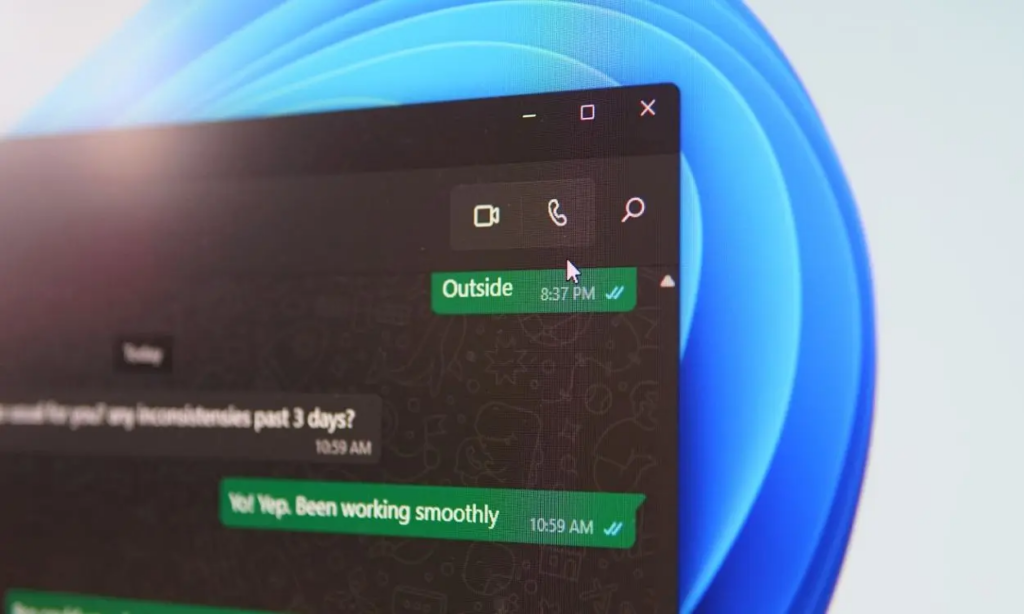
    In the end these updates are all about giving people more choices in how they communicate with the world. The WhatsApp Web Calling expansion shows that the future of messaging is moving toward a world where the device you use doesn’t matter anymore. As we move through 2026 we will likely see even more features added to the browser version to make it the most powerful tool for communication. It is a simple change but WhatsApp Web Calling is going to make a huge difference for millions of people who spend their day in front of a computer screen.

    Read Also: Will the Global AI Spending Reach Unprecedented Heights in the 2026 Economy?

    We should expect to see these buttons popping up in our browsers very soon as the testing phase is almost finished. Once WhatsApp Web Calling is available to everyone it will likely become the main way that people handle their long-distance calls and meetings. It is a smart move that keeps the app relevant in a world where we are always switching between our phones and our desks.


    Share. Facebook Twitter LinkedIn Reddit WhatsApp Telegram Email Copy Link
    Previous ArticleModern Health Paradox: 5 Reasons Behind Why We’re Still Getting Sick
    Next Article The Essence of Somali Cultural Joy Within Every National and Religious Festival

    Related Posts

    Elon Musk Medical Vision: Doctors at Risk?
    Business & Technology

    Elon Musk Medical Vision: Doctors at Risk?

    February 17, 2026
    AI hunting Maduro: how did technology track a world leader?
    Business & Technology

    AI hunting Maduro: how did technology track a world leader?

    February 16, 2026
    Future Job Losses: Roles Expected to Disappear by Next Year
    Business & Technology

    Future Job Losses: Roles Expected to Disappear by Next Year

    February 15, 2026
    Latest Posts
    Union address history: origins of the American tradition

    Union address history: origins of the American tradition

    Digital learning tools: helping Somali students study more

    Digital learning tools: helping Somali students study more

    Fasting habits: tips to help Somali children

    Fasting habits: tips to help Somali children

    Chinese medicine for migraine: can it stop the pain?

    Chinese medicine for migraine: can it stop the pain?

    You May Also Like
    Elon Musk Medical Vision: Doctors at Risk?

    Elon Musk Medical Vision: Doctors at Risk?

    February 17, 2026

    Elon Musk medical comments have once again set the internet on fire because he basically…

    AI hunting Maduro: how did technology track a world leader?

    AI hunting Maduro: how did technology track a world leader?

    February 16, 2026

    AI hunting Maduro is the big news story that everyone is talking about because it…

    Future Job Losses: Roles Expected to Disappear by Next Year

    Future Job Losses: Roles Expected to Disappear by Next Year

    February 15, 2026

    Future job losses are becoming a scary reality for a lot of office workers lately…

    DeepSeek training drama: did they really steal from ChatGPT?

    DeepSeek training drama: did they really steal from ChatGPT?

    February 14, 2026

    DeepSeek training drama is the latest big mess in the tech world because OpenAI is…

    AI spending race: where is all that money actually going?

    AI spending race: where is all that money actually going?

    February 13, 2026

    AI spending race is basically the biggest thing happening in the business world right now…

    Facebook X (Twitter) Instagram Threads TikTok

    News

    • Local News
    • Business & Economy
    • Politics
    • Education
    • Health
    • Culture

    Editor's choice

    Local News

    Union address history: origins of the American tradition

    February 18, 2026
    Education

    Digital learning tools: helping Somali students study more

    February 18, 2026
    © 2026 Somali Probe
    • Privacy Policy
    • Terms & Conditions
    • Contact us

    Type above and press Enter to search. Press Esc to cancel.